Showing posts with label Tutorials Photoshop. Show all posts

Monday, November 12, 2012

Photoshop Effects Tutorials : Changing Specific Colours MINI TUTORIAL

Written by : denilerium

Open the 2 images (The image that you want to change color in and the image of the target color that you want to achieve)


Do a selection of the part/s of the cloth on the image you want to change, I used the pen tool for all my selections.
I put a feather radius of 1 pixel to the selection.


Saturday, October 8, 2011

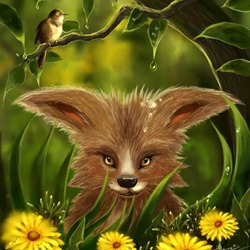
How to Paint an Artwork of a Fox Inside Photoshop


By Hatice Bayramoglu
In this tutorial, you will learn how to create this painting of a fox. This tutorial will show you techniques for coloring, shading, and outlining.


Here to See More

Friday, October 7, 2011

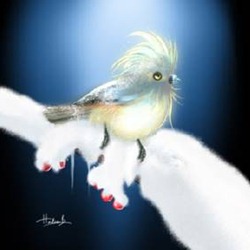
“Soundless Daydream” Photoshop Painting


By Hatice Bayramoglu 
In this tutorial, Hatice will show you how to paint a winter bird scene. This tutorial will go over some basics of painting as and show you a technique for painting snow.


Here To see More

Wednesday, October 5, 2011

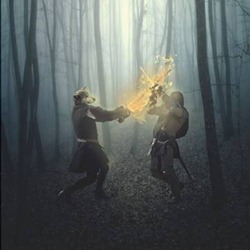
Create a Werewolf Warrior Wielding a Flaming Sword in Photoshop


By Michael Vincent Manalo
Learn how to create a fantasy-inspired photo-manipulation of two warriors: a werewolf wielding a burning sword and a human with a regular longsword. You will learn how to turn a human into a werewolf, create a flaming sword using a few brush strokes, and how to use adjustment layers to alter the color of the image.


Here To see more Tutorials

Tuesday, September 27, 2011

How Create an Electrifying Music Poster with Geometrical Elements in Photoshop CS5 Extended

By Denny Tang


Learn how to create abstract 3D shapes, stunning star flares, and more! This Photoshop tutorial will show you how to create a high-res poster in detailed steps from start to finish. You’ll need Photoshop CS5 Extended to follow this tutorial.


To See More This article Here

Monday, September 26, 2011

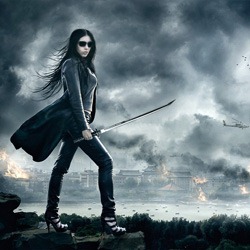
How to Create Dramatic Sci-Fi Photo Manipulation in Photoshop

By Jarka Hrnčárková


In this tutorial you'll learn how to use different blending modes to professionally blend images, you'll see different ways of adding lights and shadows and discover the way how you can add realistic fire to your pictures. Let's get started!


To See More This Article Here

Sunday, September 25, 2011

Photoshop Video Tutorial: 5 Easy Photoshop Photo Effects

By Photoshop Tutorials Editors


Retouch your photos with these five easy photo effects! These Photoshop video tutorials will show you how to create some of the most popular photo effects using professional non-destructive editing techniques. You'll need Photoshop CS4 or newer to follow these tutorials.


To See More This Article Here

Saturday, September 24, 2011

Interview with Artist: Fabio Meschini

By Ivy Mate


Be mesmerized by the fantastical works of Fabio Meschini. This interview with this talented visual artist will take you to a whimsical world full of vivid details and amazing images. His vision is truly inspiring and uniquely creative. Read on and get to know more about Fabio!


To See More This Article Here

Friday, September 23, 2011

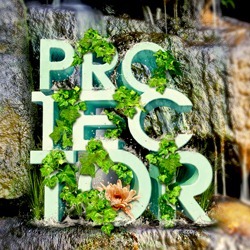
Create a Nature Text Effect Poster in Photoshop

By Xin Kun


In this tutorial we are going to learn how to make a poster inspired by WWF creative posters. With a couple of images, we will create a beautiful realistic typography with natural theme. We will learn how to blend these images together to make them become a nice one. This tutorial is full of tricks and tips to manage layers and your images.


To See More This Articel Here

Thursday, March 24, 2011

PHOTOSHOP & ILLUSTRATOR TUTORIAL: CREATE A EUPHORIC ABSTRACT HAZE

It doesn’t take a wealth of graphic complexity to produce an image charged with meaning. In this design, self-employed artist Tom Starley uses basic colours, shapes and brush strokes to create a well balanced, euphoric image with a hint of the fetal about it. This isn’t a technically complex piece – the original photograph does most of the work, but its graphic accessories enhance the emotion that is hinted at in the original.
The techniques in this tutorial will teach you how to subtly use Overlay effects and Selective Color to change the mood of your image. You’ll also learn how to place shapes to aid visual abstract design, how to use brushes to aid movement through the composition, and how to add depth to the foreground. We’ll also throw in a great trick to mask hair.
Step 1 First off, download the project files from the right of this article. Open the In The Moment brush set and double-click to install it. You’ll need a model shot, preferably one with a limited tonal palette. I’ve gone with a nude from iStockphoto that you can buy here: bit.ly/8XssvN.

Step 2 Double-click the photo to unlock it. In Photoshop, create a new layer beneath it. Fill this layer with white. Simple.

Jump to page : [ 1 ] [ 2 ] [ 3 ] [ 4 ] [ 5 ] [ 6 ]
  

Wednesday, March 16, 2011

Photoshop Masking


Unleash the power of masking…In these video Photoshop tutorials you will learn about masking techniques with the use of adjustment layers and selections, how to isolate and remove objects to produce creative compositions.

Photoshop Mask Techniques
Extracting the background (39 MB) ……… (Right Click – Save As)
Creating masks & applying adjustment layers (52 MB) ……… (Right Click – Save As)
Download exercise files
Source : 3rdelement
  

Sunday, March 13, 2011

Restore An Old Photo


Explore the power of the Refine Edge tool and masking to restore an old duo tone photo all inside Photoshop.

Restore An Old Photo

Read More Restore An Old Photo